百度千帆扔出「多模态核弹」:Qianfan-VL 3B/8B/70B全开源,OCR、数学、图表一把抓
在人工智能领域,多模态大模型正逐渐成为推动技术发展的关键力量。百度智能云千帆推出的Qianfan-VL 系列模型,以其卓越的视觉 - 语言理解能力和针对企业级应用场景的深度优化,为企业级多模态应用提供了强大的支持,为多模态 AI 的发展注入了新的活力。
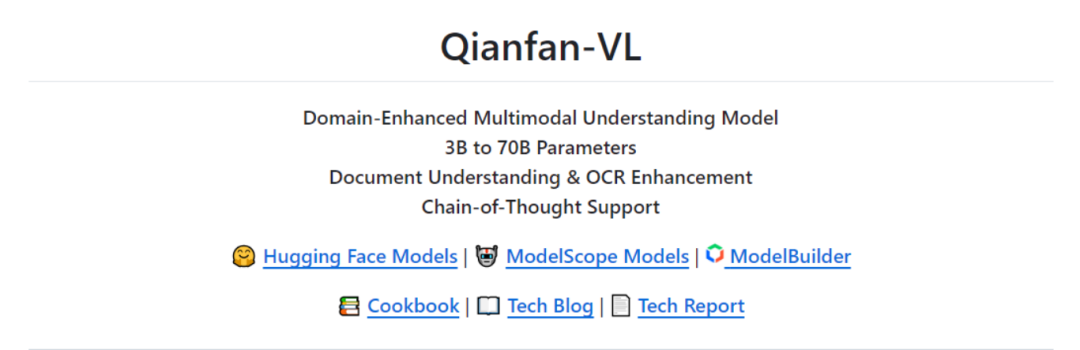
Qianfan-VL 是百度智能云千帆专为企业级多模态应用场景打造的视觉理解大模型,提供 3B、8B 和 70B 三种规格,具备出色的通用能力,并针对 OCR、教育等垂直领域进行了专项强化,能够精准满足不同场景下的多模态理解需求。
(一)多尺寸模型
Qianfan-VL 提供 3B、8B、70B 三种规格的模型,满足从端侧到云端的不同场景需求。3B 模型适用于端上实时场景和 OCR 文字识别;8B 模型适用于服务端通用场景和微调优化;70B 模型则在离线数据合成和复杂推理计算场景中表现出色。
(二)OCR 与文档理解增强
Qianfan-VL 具备强大的全场景 OCR 识别能力,能精准识别手写体、数学公式、自然场景文字等,并对卡证票据信息进行结构化提取。在文档理解方面,能够自动分析版面元素,精准解析表格和图表,支持智能问答与结构化解析。
(三)思考推理能力
8B 和 70B 模型支持通过特殊 token 激活思维链能力,在数学、推理计算等复杂场景展现卓越表现。可应用于辅助教学、拍照解题、自动判题等场景,能够结合视觉信息和外部知识进行组合推理,并提供清晰的解题思路和步骤。
(一)多模态架构设计
Qianfan-VL 的架构设计融合了业界最佳实践和自主创新。3B 模型基于 Qwen2.5 架构,8B 和 70B 模型基于 Llama 3.1 架构,通过 3T 中英文语料进行词表扩充和本地化增强,支持中英文混合理解。视觉编码器采用 InternViT 初始化,支持动态分块处理不同分辨率图像,最高支持 4K 分辨率输入。MLP 适配器实现视觉和语言模态的无缝桥接,保证信息传递的准确性和效率。
(二)能力增强训练管线
Qianfan-VL 采用创新的四阶段训练策略。第一阶段是跨模态对齐,建立视觉 - 语言基础连接映射;第二阶段是通用知识注入,建立模型的强大基础能力;第三阶段是领域增强知识注入,显著提升专业能力;第四阶段是后训练,提升指令跟随能力和偏好对齐。此外,Qianfan-VL 还构建了面向多模态任务的大规模数据合成管线,涵盖文档识别、数学解题、图表理解等核心任务,通过精细化的管线设计和中间过程数据构造,实现高质量训练数据的规模化生产。
(三)大规模并行训练
Qianfan-VL 基于百度自研昆仑芯 P800 芯片,构建了业界领先的超大规模分布式训练体系。采用数据并行、张量并行和流水线并行的三维并行组合,通过动态负载均衡、梯度同步优化、ZeRO-3 状态分片技术等手段,显著提升训练效率。同时,通过通信算子与矩阵乘法算子的硬件分离设计,实现通信计算并行,显著提升硬件利用率。
(一)通用多模态基准测试
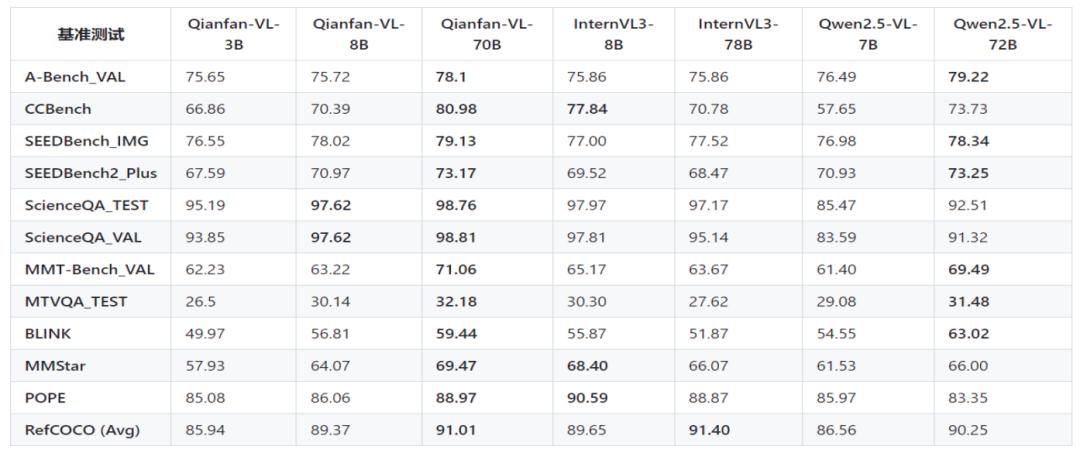
在通用多模态基准测试中,Qianfan-VL 各尺寸模型均展现出良好的性能。在科学推理方面,70B 模型在 ScienceQA TEST 上达到了 98.76%,超越多数同类模型。在抗幻觉能力方面,70B 模型在 POPE 基准上取得了 88.79%,表现出强健的事实对齐能力。在视觉感知方面,70B 模型在 SEEDBench IMG 和 Q-Bench 上分别取得了 78.85% 和 78.33% 的成绩,具有较强的竞争力。在真实世界理解方面,70B 模型在 RealWorldQA 上取得了 71.76% 的成绩,展示了模型在实际应用场景中的可行性。
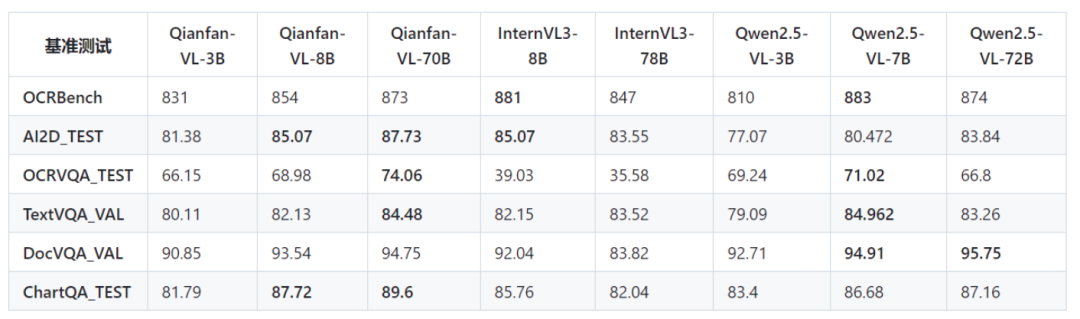
(二)OCR 能力测试
Qianfan-VL 在 OCR 能力测试中表现出色。在 OCRBench 上,70B 模型取得了 873 的成绩,接近最高水平。在 AI2D_TEST 上,70B 模型取得了 87.73% 的成绩,表现出优秀的场景文字识别能力。在 OCRVQA_TEST 上,70B 模型取得了 74.06% 的成绩,说明其在 OCR 问答方面具有较强的能力。
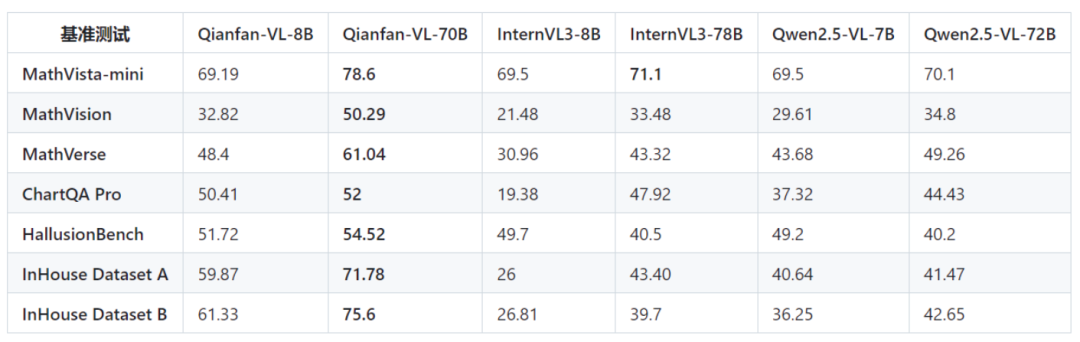
(三)数学推理能力测试
Qianfan-VL 在数学推理能力测试中具有显著优势。在 Mathvista-mini、Math Vision 和 Math Verse 等测试中,70B 模型分别取得了 78.6%、50.29% 和 61.04% 的成绩,几乎碾压式领先。这表明 Qianfan-VL 在数学解题方面具有强大的能力,能够为教育领域的智能辅导提供有力支持。
(一)OCR 识别场景
Qianfan-VL 能精准识别各类文档、票据和手写笔记中的文字信息,为企业文档处理和数据录入提供高效解决方案。例如,一家教育科技公司可以利用 3B 模型快速识别学生手写作业,提高作业批改效率。
(二)数学解题场景
Qianfan-VL 通过视觉识别数学题目并进行推理计算,支持多种题型,为教育领域提供智能辅导工具。金融企业可以利用 70B 模型分析财务报表中的复杂图表,辅助决策。
(三)文档理解场景
Qianfan-VL 自动解析文档结构并提取关键信息,支持复杂表格和图表的分析,提升企业文档管理和知识管理的效率。例如,在处理合同文档时,Qianfan-VL 能够快速提取关键条款和数据,为企业法务部门提供支持。
(四)图表分析场景
Qianfan-VL 从各类图表中提取数据并进行分析,支持趋势预测和关联推理,为数据分析和商业决策提供有力支持。例如,在市场调研报告中,Qianfan-VL 能够分析柱状图、折线图等图表,为企业管理层提供决策依据。
(一)安装
使用以下命令安装必要的库:
pip install transformers torch torchvision pillow(二)使用Transformers
以下是使用Transformers 进行推理的示例代码:
import torchimport torchvision.transforms as Tfrom torchvision.transforms.functional import InterpolationModefrom transformers import AutoModel, AutoTokenizerfrom PIL import ImageIMAGENET_MEAN = (0.485, 0.456, 0.406)IMAGENET_STD = (0.229, 0.224, 0.225)def build_transform(input_size):MEAN, STD = IMAGENET_MEAN, IMAGENET_STDtransform = T.Compose([T.Lambda(lambda img: img.convert('RGB') if img.mode != 'RGB' else img),T.Resize((input_size, input_size), interpolation=InterpolationMode.BICUBIC),T.ToTensor(),T.Normalize(mean=MEAN, std=STD)])return transformdef find_closest_aspect_ratio(aspect_ratio, target_ratios, width, height, image_size):best_ratio_diff = float('inf')best_ratio = (1, 1)area = width * heightfor ratio in target_ratios:target_aspect_ratio = ratio[0] / ratio[1]ratio_diff = abs(aspect_ratio - target_aspect_ratio)if ratio_diff < best_ratio_diff:best_ratio_diff = ratio_diffbest_ratio = ratioelif ratio_diff == best_ratio_diff:if area > 0.5 * image_size * image_size * ratio[0] * ratio[1]:best_ratio = ratioreturn best_ratiodef dynamic_preprocess(image, min_num=1, max_num=12, image_size=448, use_thumbnail=False):orig_width, orig_height = image.sizeaspect_ratio = orig_width / orig_height# calculate the existing image aspect ratiotarget_ratios = set((i, j) for n in range(min_num, max_num + 1) for i in range(1, n + 1) for j in range(1, n + 1) ifi * j <= max_num and i * j >= min_num)target_ratios = sorted(target_ratios, key=lambda x: x[0] * x[1])# find the closest aspect ratio to the targettarget_aspect_ratio = find_closest_aspect_ratio(aspect_ratio, target_ratios, orig_width, orig_height, image_size)# calculate the target width and heighttarget_width = image_size * target_aspect_ratio[0]target_height = image_size * target_aspect_ratio[1]blocks = target_aspect_ratio[0] * target_aspect_ratio[1]# resize the imageresized_img = image.resize((target_width, target_height))processed_images = []for i in range(blocks):box = ((i % (target_width // image_size)) * image_size,(i // (target_width // image_size)) * image_size,((i % (target_width // image_size)) + 1) * image_size,((i // (target_width // image_size)) + 1) * image_size)# split the imagesplit_img = resized_img.crop(box)processed_images.append(split_img)assert len(processed_images) == blocksif use_thumbnail and len(processed_images) != 1:thumbnail_img = image.resize((image_size, image_size))processed_images.append(thumbnail_img)return processed_imagesdef load_image(image_file, input_size=448, max_num=12):image = Image.open(image_file).convert('RGB')transform = build_transform(input_size=input_size)images = dynamic_preprocess(image, image_size=input_size, use_thumbnail=True, max_num=max_num)pixel_values = [transform(image) for image in images]pixel_values = torch.stack(pixel_values)return pixel_values# Load modelMODEL_PATH = "Baidu/Qianfan-VL-8B" # or Qianfan-VL-3B, Qianfan-VL-70Bmodel = AutoModel.from_pretrained(MODEL_PATH,torch_dtype=torch.bfloat16,trust_remote_code=True,device_map="auto").eval()tokenizer = AutoTokenizer.from_pretrained(MODEL_PATH, trust_remote_code=True)# Load and process imagepixel_values = load_image("./example/scene_ocr.png").to(torch.bfloat16)# Inferenceprompt = "<image>Please recognize all text in the image"with torch.no_grad():response = model.chat(tokenizer,pixel_values=pixel_values,question=prompt,generation_config={"max_new_tokens": 512},verbose=False)print(response)
(三)使用vLLM
使用vLLM 部署 Qianfan-VL 时,可以使用以下命令启动服务:
docker run -d --name qianfan-vl \--gpus all \-v /path/to/Qianfan-VL-8B:/model \-p 8000:8000 \--ipc=host \vllm/vllm-openai:latest \--model /model \--served-model-name qianfan-vl \--trust-remote-code \--hf-overrides '{"architectures":["InternVLChatModel"],"model_type":"internvl_chat"}'
然后通过以下API 调用模型:
curl 'http://127.0.0.1:8000/v1/chat/completions' \--header 'Content-Type: application/json' \--data '{"model": "qianfan-vl","messages": [{"role": "user","content": [{"type": "image_url","image_url": {"url": "https://example.com/image.jpg"}},{"type": "text","text": "<image>Please recognize all text in the image"}]}]}'
Qianfan-VL 作为百度智能云千帆推出的企业级多模态大模型,凭借其强大的视觉 - 语言理解能力、多尺寸模型设计、领域增强训练管线以及大规模并行训练技术,为企业级多模态应用提供了高效、精准的解决方案。无论是在 OCR 识别、文档理解、数学解题还是图表分析等场景中,Qianfan-VL 均展现出卓越的性能和广泛的应用前景。
项目官网:https://baidubce.github.io/Qianfan-VL/
GitHub 仓库:https://github.com/baidubce/Qianfan-VL
HuggingFace 模型库:https://huggingface.co/collections/baidu/qianfan-vl-68d0b9b0be8575c17267c85c
arXiv 技术论文:https://github.com/baidubce/Qianfan-VL/blob/main/docs/qianfan_vl_report_comp.pdf
点亮“关注”,设为“星标”,精彩不迷路!与你携手探索AI的无限可能,精彩内容持续更新!🚀